20 July 2026 | Regola Digital Consulting
Device Code Phishing: The New Way Cybercriminals Are Breaking into Microsoft 365 Accounts
Cybercriminals are using Microsoft’s device‑code login to bypass passwords and MFA, tricking users into authorising an attacker’s session and gaining full access to Microsoft 365 accounts, here's how to stop it!
Device Code Phishing: The New Way Cybercriminals Are Breaking into Microsoft 365 Accounts
Small businesses rely heavily on Microsoft 365 — Outlook, Word, Excel, PowerPoint, Teams, SharePoint, etc. The tools are convenient, familiar, and central to daily operations. But attackers have found a new way to break into 365 accounts, which doesn’t even rely on fake login pages or stealing passwords. Instead, they’re abusing a legitimate Microsoft login feature called device code authentication.
This method is becoming increasingly popular because it bypasses multi-factor authentication (MFA) and gives attackers long-term access to business email, files, and internal systems. For small organisations with limited IT resources, this type of attack can be especially damaging.
What Is Device-Code Phishing?
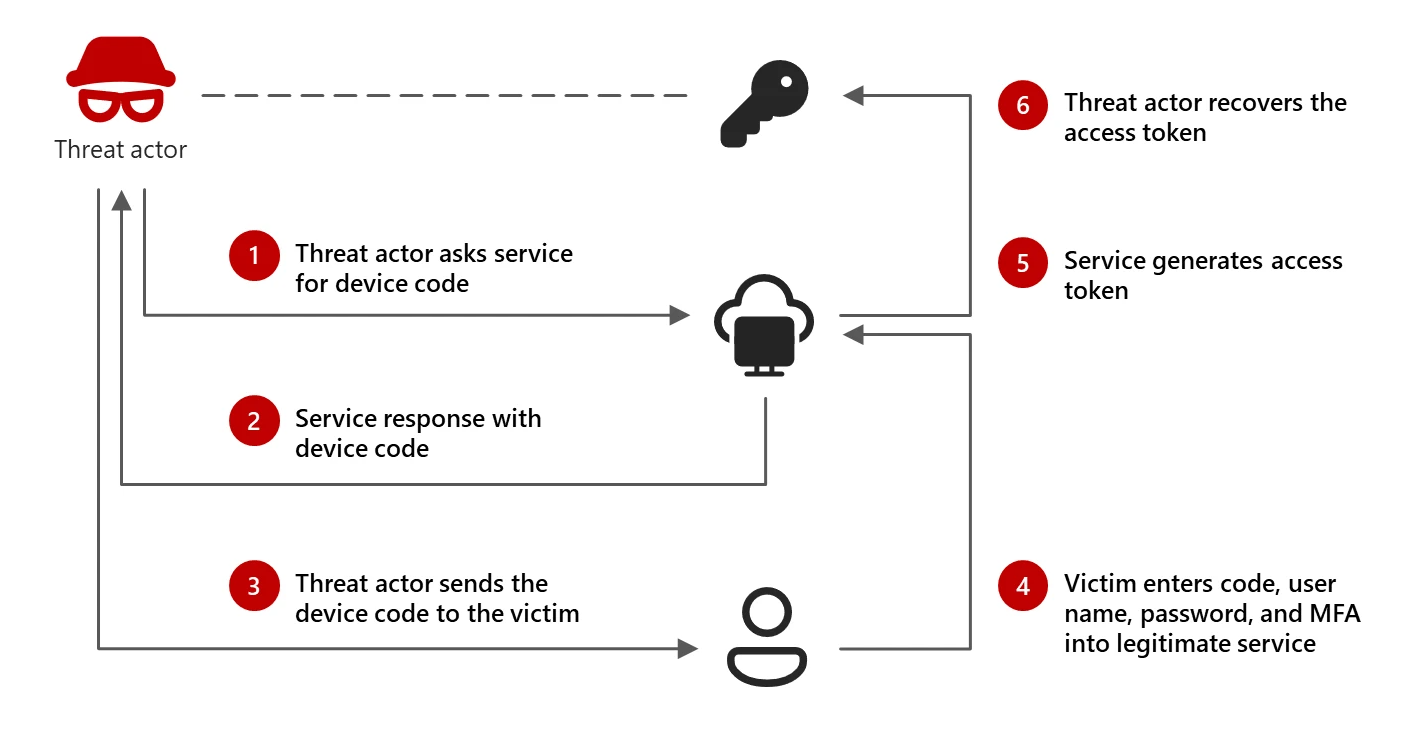
Microsoft’s device-code login flow is designed for devices like smart TVs or printers — things that can’t display a full login screen. The device shows a short code, and the user enters that code on a separate browser to approve the login.
Cybercriminals have learned how to exploit this.
Instead of tricking you with a fake Microsoft page, they send a convincing email or Teams-style message that asks you to enter a code into Microsoft’s real login page. Because the page is genuine, people trust it. But the code they enter authorises the attacker’s session, not their own. Very sneaky!
Result: The attacker walks straight into your Microsoft 365 account — no password theft, no MFA challenge, no warning.
Why Small Businesses Should Pay Attention
code phishing is dangerous because it gives attackers:
Full access to business email
Entry into Office365 tools, and OneDrive
The ability to read financial conversations
A way to impersonate staff and launch Business Email Compromise (BEC)
Long-term access using stolen tokens, even after passwords are changed
This isn’t just a technical threat — it’s a business threat.
Attackers use this access to:
Trick finance teams into sending payments
Steal sensitive documents
Ex-filtrate customer data
Monitor internal conversations
Launch ransomware or further attacks
For SMEs, even one compromised mailbox can lead to serious financial and reputational damage.
How These Attacks Are Delivered
Recent campaigns have used:
Payment-themed emails
Shared-folder notifications
Fake collaboration invites
Compromised websites that trigger the device-code flow
Some attackers even use phishing-as-a-service (PhaaS) platforms — ready-made kits that automate the entire attack. These tools make it easy for criminals with very little technical skill to run sophisticated campaigns.
How Small Businesses Can Protect Themselves
You don’t need enterprise-level security to defend against device-code phishing. These steps go a long way:
1. Train staff to recognise unusual login requests
If an email or message asks you to enter a code into Microsoft’s login page, treat it as suspicious.
2. Disable device-code authentication if not needed
Most small businesses don’t use smart TVs or IoT devices for Microsoft to login.
3. Enforce Conditional Access policies
Block risky login flows and require stronger authentication for sensitive accounts. 4. Monitor for unusual token activity
Attackers rely on stolen tokens to stay inside accounts.
5. Use email security tools that detect collaboration-style phishing
Modern phishing doesn’t always look like a fake login page.
Final Thoughts
Cybercriminals are shifting away from traditional phishing and moving toward techniques that abuse legitimate login processes. Device-code phishing is one of the fastest-growing methods because it’s simple, effective, and bypasses MFA.
For small businesses, awareness is the first line of defense. Understanding how these attacks work — and training staff to spot suspicious login prompts — can prevent account takeovers and protect your organisation from costly breaches.
Further Reading:
Device Code Phishing is an Evolution in Identity Takeover: https://www.proofpoint.com/us/blog/threat-insight/device-code-phishing-evolution-identity-takeover
Inside an AI‑enabled device code phishing campaign: https://www.microsoft.com/en-us/security/blog/2026/04/06/ai-enabled-device-code-phishing-campaign-april-2026/
What is Device Code Phishing: https://www.huntress.com/resources/what-is-device-code-phishing